Hanjeok Input Method
A program for entering Chinese characters using various methods, also convenient for finding variant character forms.
Installation
- Download
- After extracting, install all 3 files
- Do not restart after each installation finishes
- Restart all at once after installing all 3
- Run only with
Hanjeok Input Method 2.1
How to Use
You can input Chinese characters using Ppuribeop, Jeongmabeop, Jaechunbeop, etc.
Only the simplest method, Jaechunbeop (character decomposition), will be explained.
Basic
- Han/Eng key: If in English mode, switch to Korean mode
- F3: Set to Jaechunbeop mode
- Ctrl + +/- keys: Zoom in/out
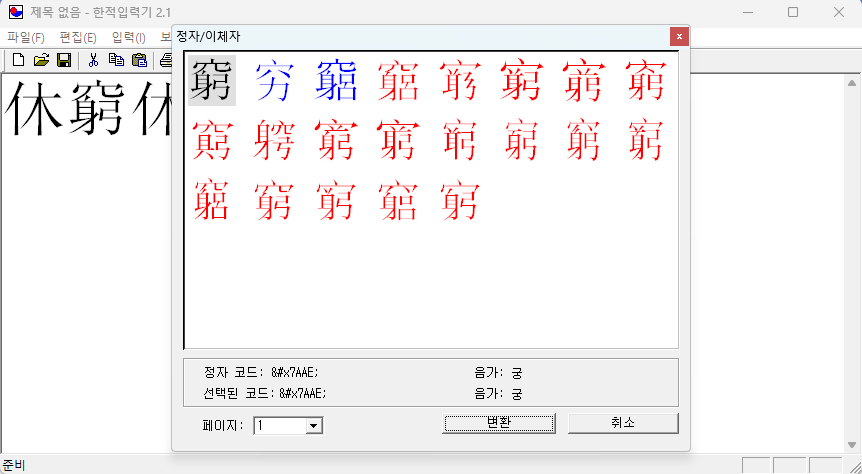
- Right-click mouse → Display color by character area
- Characters that can be copied to other programs: Black (standard characters), Blue (extended characters)
- Characters that cannot be copied to other programs (only usable in Hanjeok Input Method): Red
- < or > key: Previous/next page in Jaechunbeop popup
- +/- key: Zoom in/out in Jaechunbeop popup
Jaechunbeop (Character Decomposition) Input
- Enter 窮 by decomposing it like 혈 + 신 + 궁 (hyeol + sin + gung).
- After typing
혈신궁on the keyboard, enter the number on the left of the candidates to input that character. - If you don’t know the pronunciation of 穴, type
?신궁and select 窮 from the candidates. - If you don’t know the pronunciation of both 穴 and 身, type
*궁and select 窮 from the candidates. - You can also type the meaning-pronunciation
궁할궁(gunghal-gung). - You can also just type the pronunciation
궁(gung).
Tips:
- It’s faster to make the character you want to input appear at position 0 or 1 on the top line. =>
궁할궁or혈신궁 - It’s faster to type only the beginning part of the meaning-pronunciation to get it to position 0. => Only the beginning part
궁하from 궁할궁, only옳from 옳을가 - For difficult-to-input characters, mark them with a special symbol (Ctrl + Shift + O) and skip them, then find them later on sites like Ctext. => Characters like 丂
- The 疒 (byeongjilleom) radical is difficult to input by decomposition.
- You can also decompose by visible parts. => Type
전목and select 果 - For difficult-to-input variant characters, it’s faster to input the standard character first, then press Shift + F12 and select the corresponding variant.
Searching for Variant Characters and Alternative Forms
- Place the cursor after the character and press Shift + F12 to see standard characters (black), variant/alternative characters (blue), and alternative forms (red = cannot be copied).
Caution
- There is a bug where clicking the close icon in the standard/variant character screen (Shift+F12) crashes the program, so be careful. ⚠️ Everything you entered will be lost
- You must use Esc or the Convert/Cancel button.
A browser-based alternative
Hanjeok Input Method installs on Windows only.
If you work on a Mac, or sit at a PC where you cannot install anything, it is out of reach.
That is why I built a web tool that enters characters the same way.
Unicode Hanja IME Guide — a browser is all you need. Nothing to install, no account.
Everything you already learned still applies.
- Jaechunbeop (decomposition) — type
인목and 人 + 木 gives you 休. - Meaning-pronunciation or pronunciation —
쉴휴works, and so does just휴. - Wildcards —
?for one unknown character,*for several. Same use as here. - Number keys — press 0~9 beside a candidate to insert it.
What changed is how many characters it reaches.
- All 93,189 Unicode hanja are offered as candidates. (Extension blocks G, H and I are not included yet.)
- It also holds 251,751 words, so typing
가감inserts 加減 as a whole word. - An extension-block badge beside each candidate warns you which characters may show up as empty boxes once pasted elsewhere.
Above all, there is nothing like the Shift+F12 crash described above.
The editor pane is saved in your browser automatically, so closing the window by accident does not cost you the text.
To look up what a character you found means, try the Korean Studies Web Dictionary — it maps multi-code Hanja, identical in shape but different in code, onto their standard code before searching.
And if an existing document already mixes multi-code Hanja, Hanja Normalization will unify them.